

Release news Naviate for Revit
Naviate MEP December release news 3.11
Release news for MEP. Includes the new features Auto Routing, Create Bill of Materials, Data Flow and Set Slope, in addition to improvements and fixes.
-
Feature
-
Feature
-
Feature
-
Feature
-
Update
-
Update
-
Update
-
Update
-
Fix
Auto Routing
This is a new command in [N] MEP that further advances the existing “Roll Into Main” command. Compatible with the ‘Pipe’ MEP System Family, Auto Routing will roll the branch Pipe into a main with a user-specified, custom angle elbow - then complete the connection with a tee.
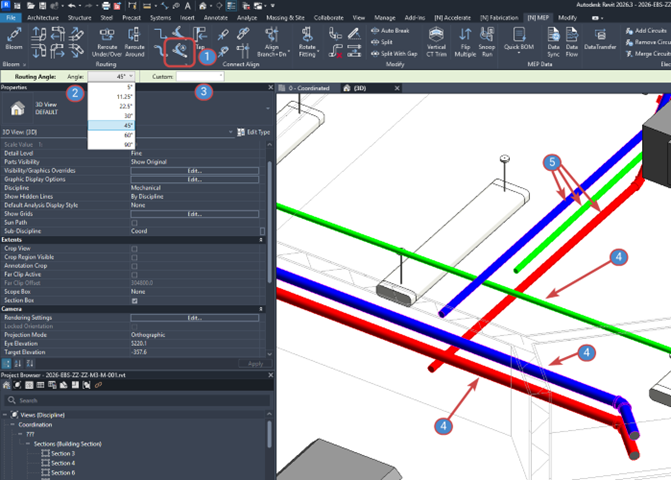
Figure 3
The steps to successfully execute an Auto Routing are as follows (see Figure 3):
- In [N] MEP, click the Auto Routing button.
- In the Options Bar, choose a Default Angle at which the Elbow Fitting will be. As seen above, the default angle value options are: 5, 11.25, 22.5, 30, 45, 60, and 90.
- Instead of choosing a Default Angle in step 2, the Custom parameter can be used to enter a non-Default value for the Elbow Fitting to be set.
- Select main Pipe.
- Select branch Pipe.
Result: The Elbow Fitting is angled as set in the Options Bar with a connecting, angled Pipe, plus the Tee Fitting as set in the Pipe Type’s Routing Preferences.
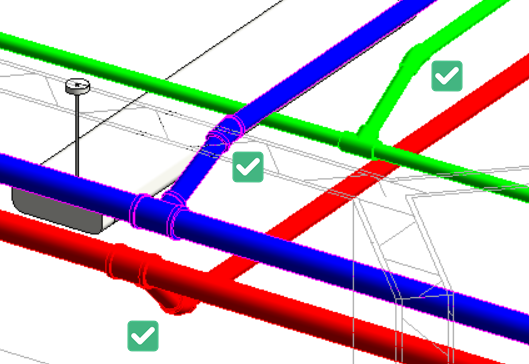
Figure 4
Note: For v3.11, Auto Routing currently only is compatible with a branch and main that are perpendicular or 90-degrees to each other.
Create and Manage Bill of Materials (BOMs)
- migrated from [N] Fabrication
Command originally from [N] Fabrication, ‘Create and Manage Bill of Materials (BOMs)’ has been added to the [N] MEP ribbon. The BOM Commands include the following:
- BOM Options
- Custom BOM
- BOM Options
- Add to BOM
- Remove from BOM
- Show Assigned BOM
For more information, refer to this link to be redirected to the command’s Pinnacle Help Guide: Create and Manage Bill of Materials (BOMs) - Pinnacle Help Guide
Data Flow
- migrated from [N] Fabrication
Command originally from [N] Fabrication, ‘Data Flow’ has been added to the [N] MEP ribbon.
For more information, refer to this link to be redirected to the command’s Pinnacle Help Guide: Data Flow - Pinnacle Help Guide
Set Slope
- migrated from [N] Fabrication
Command originally from [N] Fabrication, ‘Set Slope’ has been added to the [N] MEP ribbon.
For more information, refer to this link to be redirected to the command’s Pinnacle Help Guide: Set Slope - Pinnacle Help Guide
Licensing Updates: Login/Logout
Naviate Login and Logout is now possible in an active Revit session, no longer requiring closing and re-opening Revit to release or activate a license.
After opening the About/Licensing dialog in [N] MEP or [N] Fabrication, Naviate Login and Naviate Logout buttons are now available. These buttons can be used in the Revit session, without the need to restart Revit Login and re-activate the Naviate license.
If you decline Login at Revit startup, or had no connection to the Internet, clicking Naviate Login at the About/Licensing dialog will open the default browser to sign in to your Symetri account. Additionally, there is an option to scan a QR code to direct to the appropriate web link to sign in.
Note: Logging out and Logging back in with a different Symetri account is currently not possible in v3.11. It is only possible at this time to Log back in using same email address (Symetri account) that was used at the time of Logging out.
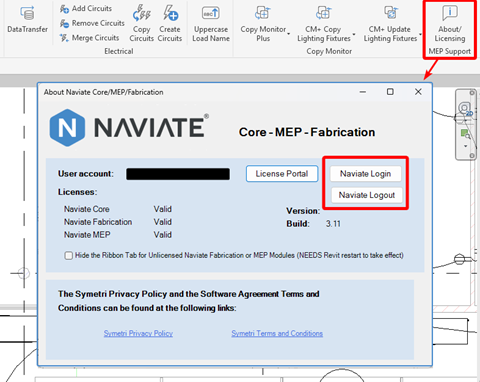
Figure 1
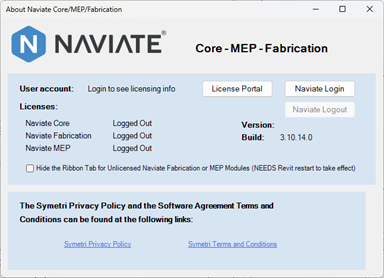
Figure 2
Data Sync
Refactoring and various performance improvements.
Bloom
Added compatibility with preselection of single or multiple elements.
Rotate Fitting 180
Added compatibility with preselection of elements.
Fixes
- Rotate Fitting
- Resolved an issue with unconnected fittings.
- Data Sync
- Resolved an issue with command not working with Filled Regions and duplicating relationships.
- Copy Monitor Plus
- Resolved an issue with the newly copied RFAs not populating its Host parameter value. Resolved an issue with new rows added in CM+ Manager not appearing in the command dropdown.
- Reroute Around and Over/Under
- Resolved an issue with the command not working with insulated Straights.
- Align Branch
- Resolved an issue with the command not compatible with branches that are connected to elements on the non-main side